How to Run a Classroom Escape Room with a Free Digital Breakout Box
How to Run a Classroom Escape Room with a Free Digital Breakout Box
A well-designed classroom escape room turns an ordinary school day into an unforgettable adventure. The collaborative energy, the focus on critical thinking, and the shared excitement of cracking a tough academic challenge create unmatched engagement across grade levels.
The biggest obstacle for most teachers, however, is the hardware.
Commercial breakout kits, heavy metal hasps, 4-digit padlocks, and alphabet dials are pricey. Combinations accidentally reset mid-lesson, tiny keys vanish into thin air, and resetting physical boxes between class periods eats up precious planning time.
To solve this problem without draining your supply budget, you can now run a seamless classroom escape room using our interactive Digital Breakout Box.
What Is the Digital Breakout Box?
The Digital Breakout Box is a free, interactive browser tool designed specifically to simulate physical escape room hardware without any downloads or plastic locks.
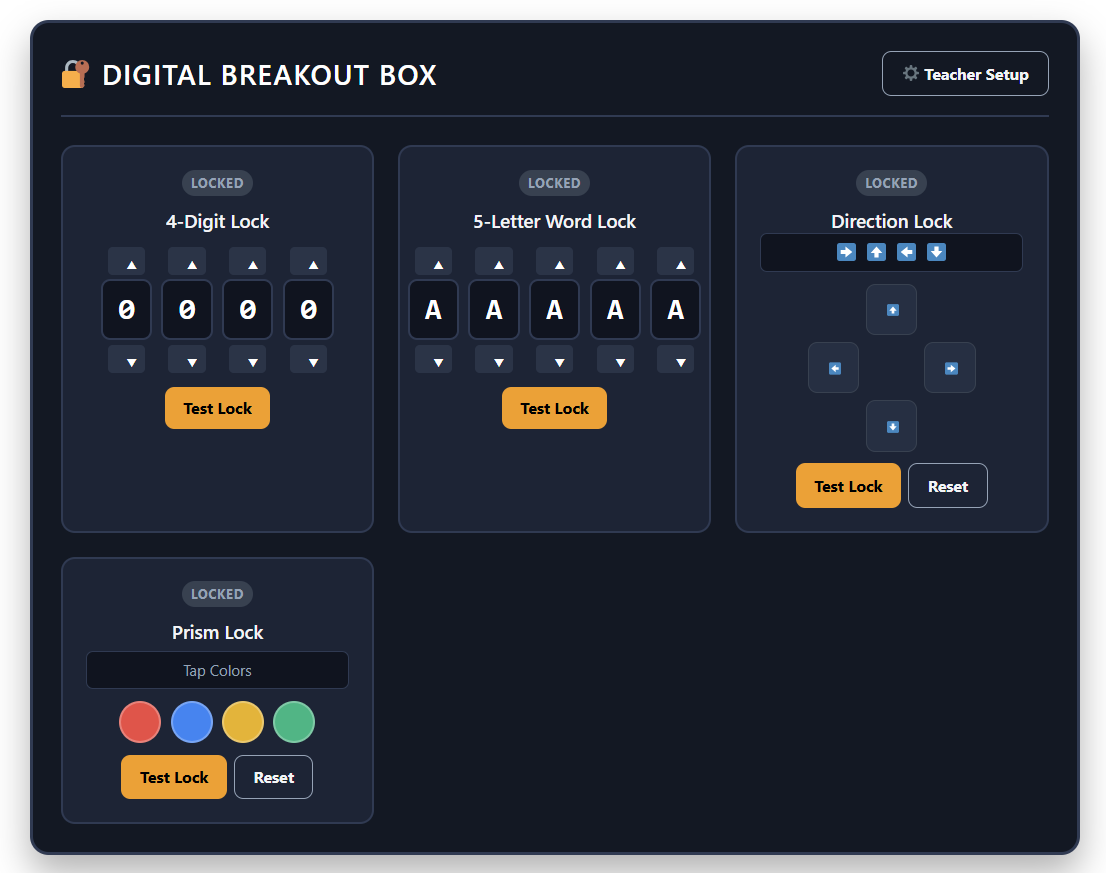
You can project the safe onto an interactive whiteboard for whole-class teamwork, or send the direct link to student Chromebooks, iPads, or tablets. The simulator features four classic locks:
4-Digit Number Lock: Traditional smooth-dial tumbler.
5-Letter Word Lock: Alphabet tumblers for secret codewords.
Directional Lock: A 4-way arrow pad (Up, Down, Left, Right).
Color Prism Lock: A sequence disc selector (Red, Blue, Yellow, Green).
Teachers can toggle any lock on or off, set secret answers, and type a customized victory message that pops open when students crack the safe.
How to Set the Locks & Share with Students (Step-by-Step)
Setting up your breakout safe takes under two minutes:
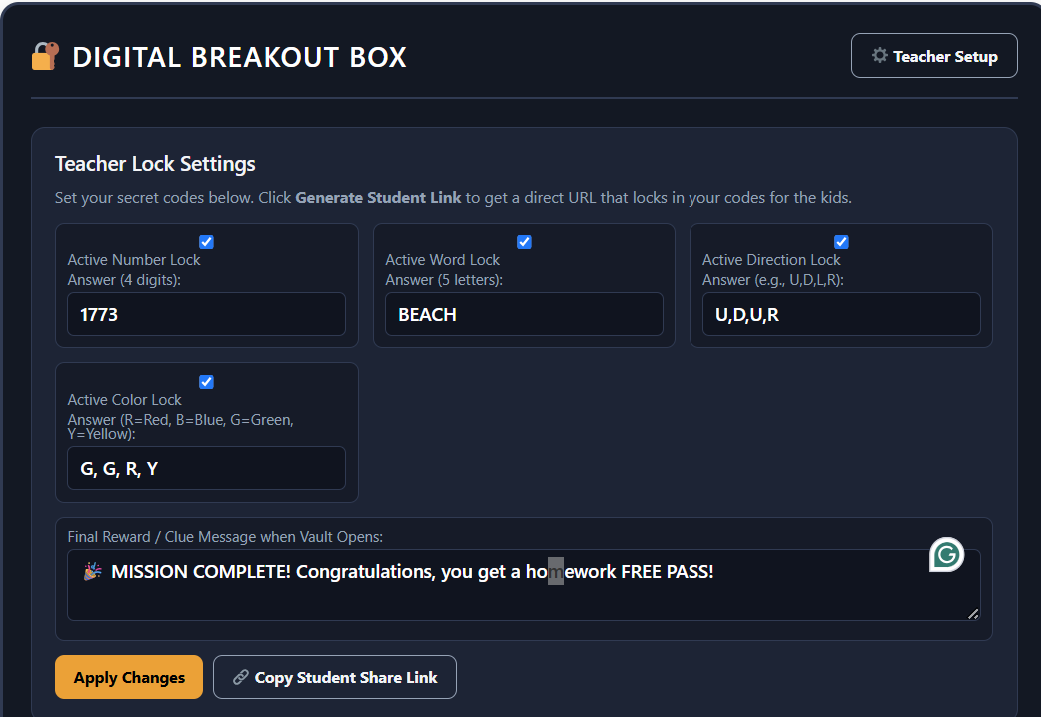
Open the Setup Panel: Head to the Digital Breakout Box and click the ⚙️ Teacher Setup button in the top corner.
Select Your Locks: Check the boxes for the locks you want to use. You can activate just one lock (like a simple 4-digit code) or use all four for an epic multi-stage challenge.
Set Your Secret Codes: Enter your custom answers:
4-Digit Lock: Any 4 numbers (e.g., 3842).
5-Letter Lock: Any 5-letter word (e.g., CLUES).
Direction Lock: A comma-separated arrow path using U, D, L, R (e.g., U,R,D,L).
Color Lock: A comma-separated sequence using R, B, Y, G (e.g., R,B,Y,G).
Customize the Reward Clue: Type the victory message that pops up once all active locks are cracked (e.g., a secret password, the location of a hidden classroom prize, or the final clue revealing the culprit).
Click “🔗 Copy Student Share Link”: The tool creates an encoded link containing your secret answers.
Share with the Class: Paste the copied link into Google Classroom, Canvas, Seesaw, or your classroom slides. When students open this link, the locks are set to your combinations, and the teacher setup drawer is completely locked so they cannot peek at the answers!
Teacher Tip: If you prefer a whole-group activity, simply leave the tool projected on your whiteboard and have student teams take turns coming up to test their solutions!
3 Easy Clue Ideas for a Classroom Escape Room
You don’t need an entire weekend to plan challenges. Here is how you can connect everyday curriculum tasks directly to the locks:
1. Math Task Cards for the 4-Digit Lock
Set up four multi-step word problems or skill cards around your room. The answer to Problem 1 provides the first digit, Problem 2 provides the second, and so on. Students collaborate to solve the math sequence and test their combination on the digital safe.
2. Vocabulary Clues for the 5-Letter Word Lock
Hide five reading comprehension or vocabulary questions across the classroom. Each correct answer uncovers a single letter of an anagram (such as C-L-U-E-S or S-O-L-V-E). Once all five questions are completed, students unscramble the keyword to unlock the word tumbler.
3. Coordinate Maps for the Directional Lock
Incorporate geography, coordinate grids, or grid-based math mazes. As students trace the correct route from start to finish, the sequence of movements (e.g., Up, Right, Down, Left) becomes the secret code for the directional lock.
Want Engaging Classroom Escape Rooms with Zero Prep?
Designing custom clue stations from scratch can be rewarding, but teacher time is precious. If you want the immersive buzz of a classroom escape room without hours of cutting, laminating, and problem design, explore our complete collection of Print-and-Go Math and Reading Mysteries.
Every mystery pack provides an engaging, ready-to-use learning experience:
Standards-aligned academic clue sheets in math, history, and CSI literacy
High-interest crime-scene storylines and suspect alibis
Step-by-step evidence elimination worksheets
A built-in paper reveal that requires zero screens or setup
While our print-and-go resource packs include everything you need right out of the box, you can always dial up the excitement by pairing them with this free digital breakout box. Use the final suspect’s name as the 5-letter word code, or make the culprit’s hideout coordinate the 4-digit combination that unlocks the final victory screen!
Frequently Asked Questions
Can I run this classroom escape room tool without physical locks?
Yes. The digital breakout box completely replaces physical boxes and padlocks, allowing students to test their solutions digitally on any internet-enabled device.
Can students cheat and see the lock combinations?
When you click Copy Student Share Link, the configuration settings are hashed directly inside the URL string. Students cannot open the teacher settings menu from the shared player link.
Launch Your Mission Today
Ready to transform your next review session? Open the Digital Breakout Box, configure your locks, and let your students crack the case!